
Recent posts
#1
Announcements & Updates / Free soundset for Electra 3.5
Last post by Markus Krause - October 02, 2026, 08:43:46 AMHighlights
Download link:
https://www.tone2.com/free-sounds.html
- 20 free patches
- Created by the developer of the synthesizer (Markus Krause)
- This soundset uses the new features of Electra 3.5
- Velocity, Modwheel, Pitchwheel, Key Split and Aftertouch support
- All patches are carefully normalized for consistent volume and clarity
- Comfortable installation and seamless integration into the Electra UI
Download link:
https://www.tone2.com/free-sounds.html
#2
Electra 3 / Free soundset for Electra 3.5
Last post by Markus Krause - October 02, 2026, 08:42:27 AMHighlights
Download link:
https://www.tone2.com/free-sounds.html
- 20 free patches
- Created by the developer of the synthesizer (Markus Krause)
- This soundset uses the new features of Electra 3.5
- Velocity, Modwheel, Pitchwheel, Key Split and Aftertouch support
- All patches are carefully normalized for consistent volume and clarity
- Comfortable installation and seamless integration into the Electra UI
Download link:
https://www.tone2.com/free-sounds.html
#3
Off topic / macOS 27 Golden Gate compatibi...
Last post by Markus Krause - September 29, 2026, 11:39:05 AMSynthesizers:
The latest versions of all our synthesizers are compatible with macOS 27 Golden Gate.
They offer the highest possible performance with native M1/M2/M3/M4/M5/M6 support.
The latest updates are available here: https://www.tone2.com/download.html
Effects:
UltraSpace requires a Rosetta2 installation.
FilterBank, BiFilter, Warmverb Multi-FX and Akustix were released two decades ago. They are discontinued on the Mac and not longer compatible.
Sadly it is not possible to port our old effect plugins to M1 native / Intel 64 bit support with reasonable effort.
The latest versions of all our synthesizers are compatible with macOS 27 Golden Gate.
They offer the highest possible performance with native M1/M2/M3/M4/M5/M6 support.
The latest updates are available here: https://www.tone2.com/download.html
Effects:
UltraSpace requires a Rosetta2 installation.
FilterBank, BiFilter, Warmverb Multi-FX and Akustix were released two decades ago. They are discontinued on the Mac and not longer compatible.
Sadly it is not possible to port our old effect plugins to M1 native / Intel 64 bit support with reasonable effort.
#4
Icarus / Re: Reset size "back to normal...
Last post by Harri - September 25, 2026, 12:16:24 PMExcellent, there it was! Thank you very much for your reply. Will purchase synth!
#5
Icarus / Re: Reset size "back to normal...
Last post by Markus Krause - September 22, 2026, 09:03:54 AMHello Harri,
there are 3 ways to reset the size of the GUI:
1) Click on the 'size' button in the top left section of the GUI. It is located below the big 'macro' knob.
2) Run the standalone App on PC, use the scrollbars and click on the diagonal white lines in the bottom right of the GUI.
3) You can also reset the size to default by deleting the 'IcarusEditorSize.cfg' file. It is located within the '...\Icarus_data' directory. If you can't remember where you installed the plugin you can do a file search in windows for IcarusEditorSize.cfg to find it.
Best Regards,
Markus Krause
there are 3 ways to reset the size of the GUI:
1) Click on the 'size' button in the top left section of the GUI. It is located below the big 'macro' knob.
2) Run the standalone App on PC, use the scrollbars and click on the diagonal white lines in the bottom right of the GUI.
3) You can also reset the size to default by deleting the 'IcarusEditorSize.cfg' file. It is located within the '...\Icarus_data' directory. If you can't remember where you installed the plugin you can do a file search in windows for IcarusEditorSize.cfg to find it.
Best Regards,
Markus Krause
#6
Icarus / Solved: Reset size "back to no...
Last post by Harri - September 19, 2026, 11:46:19 AMHello!
I changed the size of the synth GUI and ended up in the following situation:
https://1drv.ms/i/c/8c38ebdf0a3e38b9/IQDgJGO7XBkyTIO5BsFmt8AzAdM0Yn9d5Q-CiX5NgsRVEqQ?e=1Br0kZ
It now seems inpossible to reach the "right left corner" also becuause even if i move the window, it does not render the lowest part of the synth.
Restarting ableton in new project does not help, it is now "mega big". I would need it back to "normal size".
I am in Ableton Suite 12.3.5 (newest) and as you can see the resolution on my screen is max.
Thank you for your advice sirs. I think i will be buying and do own a few of your products already.
Best Regards,
Harri
I changed the size of the synth GUI and ended up in the following situation:
https://1drv.ms/i/c/8c38ebdf0a3e38b9/IQDgJGO7XBkyTIO5BsFmt8AzAdM0Yn9d5Q-CiX5NgsRVEqQ?e=1Br0kZ
It now seems inpossible to reach the "right left corner" also becuause even if i move the window, it does not render the lowest part of the synth.
Restarting ableton in new project does not help, it is now "mega big". I would need it back to "normal size".
I am in Ableton Suite 12.3.5 (newest) and as you can see the resolution on my screen is max.
Thank you for your advice sirs. I think i will be buying and do own a few of your products already.
Best Regards,
Harri
#7
Icarus / New song with Icarus to check ...
Last post by aaron aardvark - August 19, 2026, 08:13:04 AMI added a new song to my music website called: "For You and Me"; it is the song on top. The song has some Icarus and some non-Tone 2 synths. Please tell me how you like the song and how it can be improved, and I will return the favor! If you don't have a recent thread, leave me a link. Here is my link:
https://www.soundclick.com/aaronaardvark
https://www.soundclick.com/aaronaardvark
#8
Announcements & Updates / Tone2 Electra 3.5 released
Last post by Markus Krause - August 06, 2026, 10:45:02 AMNew! Tone2 Electra 3.5
Product page:
https://www.tone2.com/tone2-electra3.html
What's new in Tone2 Electra 3.5?
https://www.tone2.com/tone2-electra3-update.html
Free demo and update download:
https://www.tone2.com/download.html
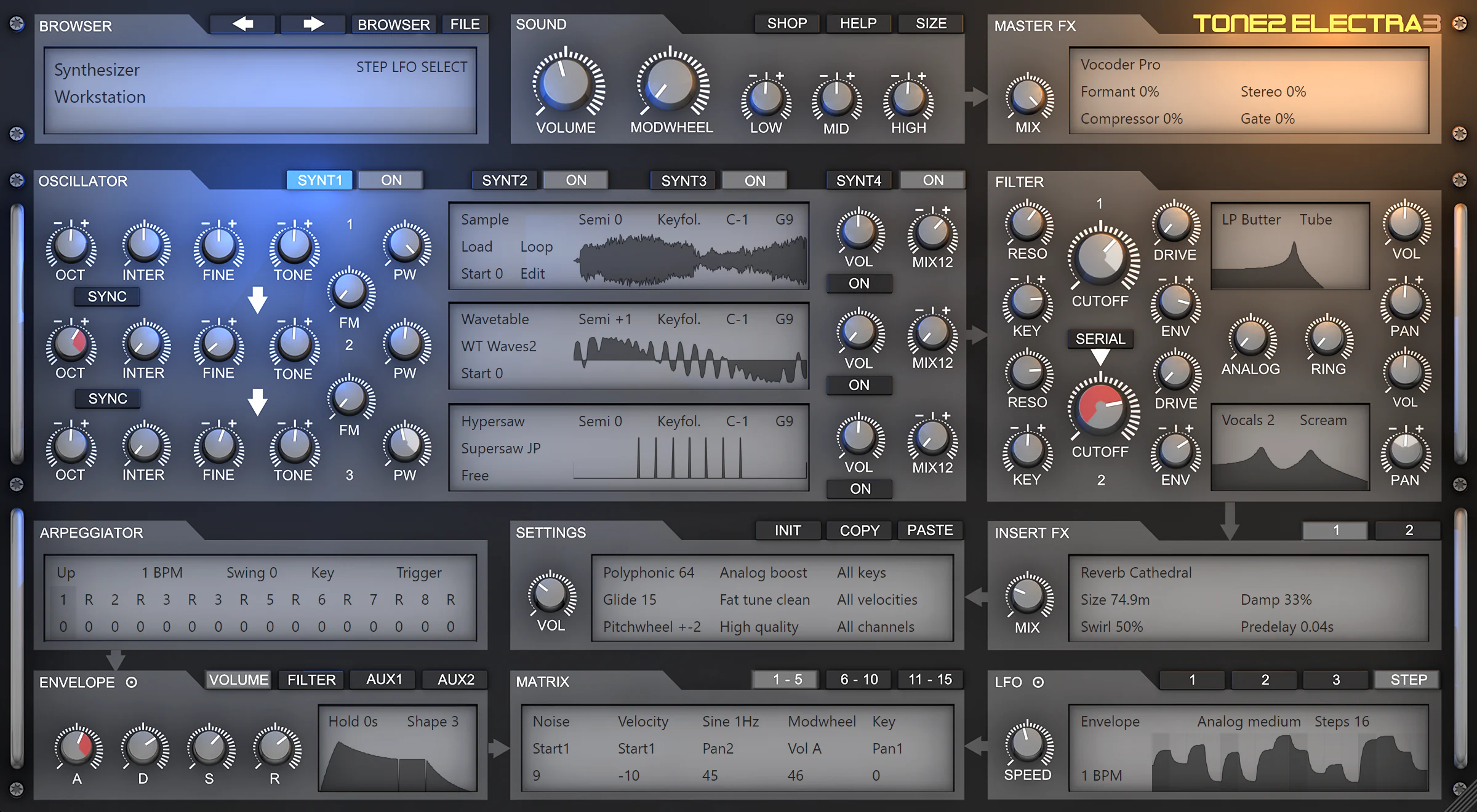
Click here for a large view of the new interface: https://www.tone2.com/mypic/Tone2_Electra_3.5_screenshot.webp
Tone2 Audio has released an update for their multilayer-synthesizer-workstation Electra. The update to v3.5 is a major update and is free for anyone who bought Electra 3.
It is downward compatible with previous versions. Existing song projects and patches can be loaded without any further steps necessary. They will benefit from the enhanced sound-quality.
What's new in Electra 3.5?
4 additional INSERT FX slots:
20 additional MATRIX slots:
9 new filter types:
Enhanced sound:
New features for the GUI:
More easy layering of sounds:
Enhancements for the GUI:
Further enhancements:
Fixes:
Product page:
https://www.tone2.com/tone2-electra3.html
What's new in Tone2 Electra 3.5?
https://www.tone2.com/tone2-electra3-update.html
Free demo and update download:
https://www.tone2.com/download.html
Click here for a large view of the new interface: https://www.tone2.com/mypic/Tone2_Electra_3.5_screenshot.webp
Tone2 Audio has released an update for their multilayer-synthesizer-workstation Electra. The update to v3.5 is a major update and is free for anyone who bought Electra 3.
It is downward compatible with previous versions. Existing song projects and patches can be loaded without any further steps necessary. They will benefit from the enhanced sound-quality.
What's new in Electra 3.5?
4 additional INSERT FX slots:
- Each of the 4 layers has an additional insert effect slot. Here you can pick from from 64 different effect types.
20 additional MATRIX slots:
- Each of the 4 layers now has 5 additional modulation matrix slots. They can be accessed by clicking on the '11-15' button.
9 new filter types:
- LP MS-20: A screaming lowpass filter with self-oscillation. It sounds analog and uses 0-delay technology.
- Phaser 2x: Analog 4-stage phaser with negative feedback.
- Phaser 3x: Analog 6-stage phaser with positive feedback.
- Phaser 4x: Analog 8-stage phaser with negative feedback.
- Phaser 5x: Analog 10-stage phaser with positive feedback.
- Formant 1x: Analog formant filter with soft saturation.
- Formant 2x: Analog formant filter with two peaks and soft saturation.
- Formant 3x: Analog formant filter with three peaks and soft saturation.
- Formant 4x: Analog formant filter with four peaks and soft saturation.
Enhanced sound:
- Major and minor chords sound better with the microtuning mode 'Fat tune clean'.
- Enhanced sound of the Reverbs Hall and Room. They have a smoother rolloff, less phasing, more detail and more depth.
- Enhanced sound of the Reverbs Infinity, Cathedral and Big. They have a smoother rolloff, less phasing, higher precision and more depth.
- Enhanced sound of the Reverbs Glass, Plate and Cold. They have a smoother rolloff, less phasing, more detail and more depth.
- Enhanced sound of Delay. It has a nicer stereo field and better default values.
- Enhanced sound of Delay Band. It has a nicer stereo field.
- Enhanced sound of Delay Diffuse. It has a nicer stereo field.
- Phychoacoustic processing is now calculated with 64 bit precision.
- The equalizer is now calculated with 64 bit precision.
- The enhanced FFT precision results in more accurate resampling of waveforms.
- COPY->Stack unison sounds more in-tune.
New features for the GUI:
- A small target icon is shown next to the ENVELOPE and LFO which can be used for drag & drop.
- It is now possible to change the LFO speed by clicking on the frequency display.
More easy layering of sounds:
- It is now possible to copy and paste layers among different synth instances.
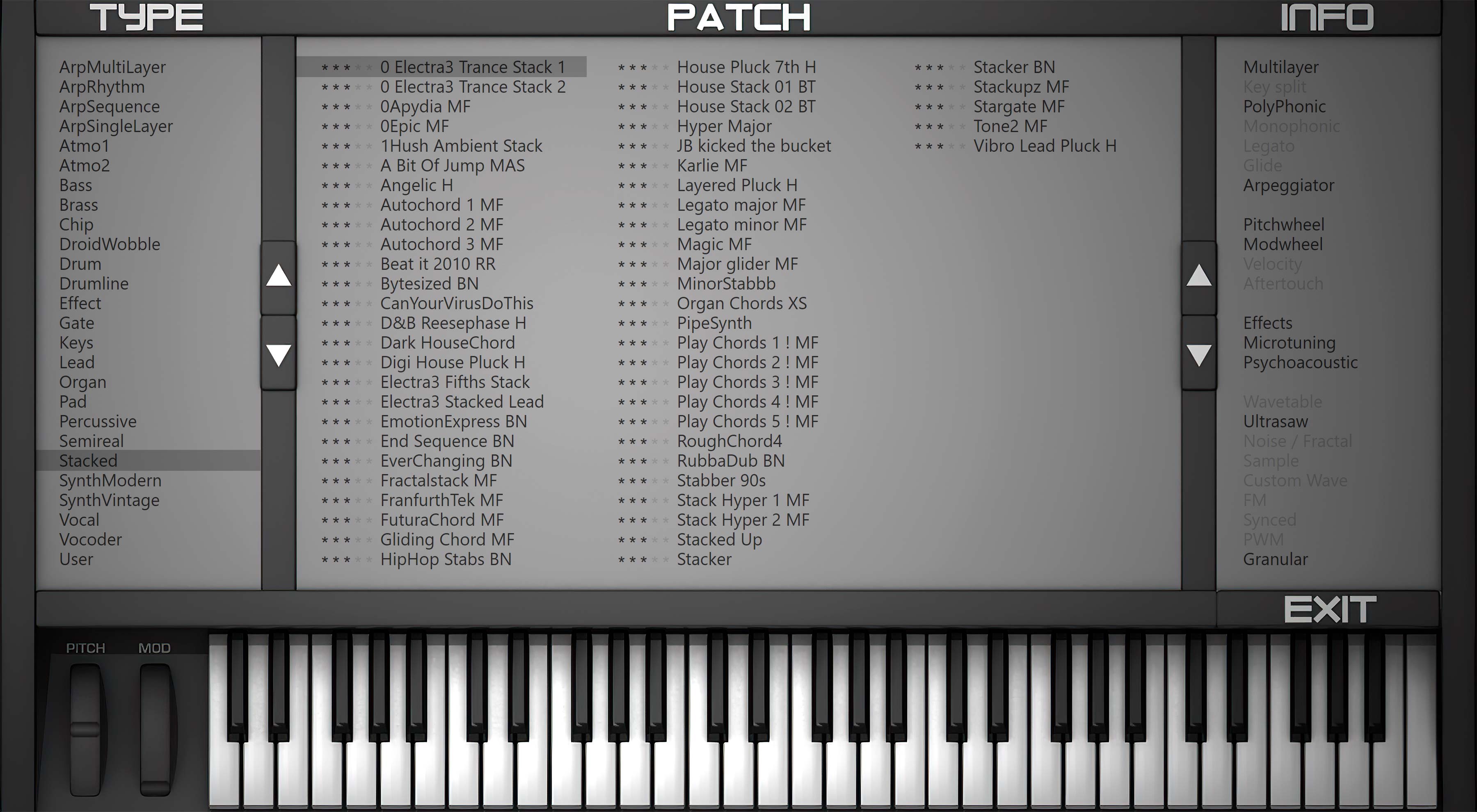
- 'FILE->Load patch to synth layer' now opens the patch browser where you can comfortably stack a patch.
- 'PASTE->Load a patch to current layer' opens the patch browser where you can comfortably stack a patch.
Enhancements for the GUI:
- The skins for the ZOOM levels 66% and 100% are sharper.
- The animations of displays and other GUI elements are smoother. They are twice as fast.
- More precise graphics for the box shadows.
- The BROWSER button is wider and is not longer called BROWS.
- The menu entries in COPY and PASTE have been reworked to be more straightforward.
- Initializing a layer or patch sets the current envelope and matrix tab to the first one.
- Enabling a layer with the ON button automatically selects the layer for editing.
- When using drag & drop the correctly linked matrix page is always shown automatically.
- Loop-points are hidden if no sample is used.
- More detailed descriptions for some tooltips.
- LFO frequency is shown more precisely.
- It is not longer possible to freeze the synth by importing gigantic wave files as waveforms.
- Many small enhancements.
Further enhancements:
- Workaround for crappy DAWs that return garbage vales as bpm-rate or song-position.
- Better default values for the 'init' patch.
Fixes:
- Fixed a typo in 'OSC23 FM'.
- 'LP Butter' and some fractal filters could emit a tiny click under very special conditions.
- Removed a tiny DC offset that could occur with Delay Wide if LOW CUT is set to exactly 0.
#9
Electra 3 / Tone2 Electra 3.5 released
Last post by Markus Krause - August 06, 2026, 10:37:29 AMNew! Tone2 Electra 3.5
Product page:
https://www.tone2.com/tone2-electra3.html
What's new in Tone2 Electra 3.5?
https://www.tone2.com/tone2-electra3-update.html
Free demo and update download:
https://www.tone2.com/download.html
Click here for a large view of the new interface: https://www.tone2.com/mypic/Tone2_Electra_3.5_screenshot.webp
Tone2 Audio has released an update for their multilayer-synthesizer-workstation Electra. The update to v3.5 is a major update and is free for anyone who bought Electra 3.
It is downward compatible with previous versions. Existing song projects and patches can be loaded without any further steps necessary. They will benefit from the enhanced sound-quality.
What's new in Electra 3.5?
4 additional INSERT FX slots:
20 additional MATRIX slots:
9 new filter types:
Enhanced sound:
New features for the GUI:
More easy layering of sounds:
Enhancements for the GUI:
Further enhancements:
Fixes:
Product page:
https://www.tone2.com/tone2-electra3.html
What's new in Tone2 Electra 3.5?
https://www.tone2.com/tone2-electra3-update.html
Free demo and update download:
https://www.tone2.com/download.html
Click here for a large view of the new interface: https://www.tone2.com/mypic/Tone2_Electra_3.5_screenshot.webp
Tone2 Audio has released an update for their multilayer-synthesizer-workstation Electra. The update to v3.5 is a major update and is free for anyone who bought Electra 3.
It is downward compatible with previous versions. Existing song projects and patches can be loaded without any further steps necessary. They will benefit from the enhanced sound-quality.
What's new in Electra 3.5?
4 additional INSERT FX slots:
- Each of the 4 layers has an additional insert effect slot. Here you can pick from from 64 different effect types.
20 additional MATRIX slots:
- Each of the 4 layers now has 5 additional modulation matrix slots. They can be accessed by clicking on the '11-15' button.
9 new filter types:
- LP MS-20: A screaming lowpass filter with self-oscillation. It sounds analog and uses 0-delay technology.
- Phaser 2x: Analog 4-stage phaser with negative feedback.
- Phaser 3x: Analog 6-stage phaser with positive feedback.
- Phaser 4x: Analog 8-stage phaser with negative feedback.
- Phaser 5x: Analog 10-stage phaser with positive feedback.
- Formant 1x: Analog formant filter with soft saturation.
- Formant 2x: Analog formant filter with two peaks and soft saturation.
- Formant 3x: Analog formant filter with three peaks and soft saturation.
- Formant 4x: Analog formant filter with four peaks and soft saturation.
Enhanced sound:
- Major and minor chords sound better with the microtuning mode 'Fat tune clean'.
- Enhanced sound of the Reverbs Hall and Room. They have a smoother rolloff, less phasing, more detail and more depth.
- Enhanced sound of the Reverbs Infinity, Cathedral and Big. They have a smoother rolloff, less phasing, higher precision and more depth.
- Enhanced sound of the Reverbs Glass, Plate and Cold. They have a smoother rolloff, less phasing, more detail and more depth.
- Enhanced sound of Delay. It has a nicer stereo field and better default values.
- Enhanced sound of Delay Band. It has a nicer stereo field.
- Enhanced sound of Delay Diffuse. It has a nicer stereo field.
- Phychoacoustic processing is now calculated with 64 bit precision.
- The equalizer is now calculated with 64 bit precision.
- The enhanced FFT precision results in more accurate resampling of waveforms.
- COPY->Stack unison sounds more in-tune.
New features for the GUI:
- A small target icon is shown next to the ENVELOPE and LFO which can be used for drag & drop.
- It is now possible to change the LFO speed by clicking on the frequency display.
More easy layering of sounds:
- It is now possible to copy and paste layers among different synth instances.
- 'FILE->Load patch to synth layer' now opens the patch browser where you can comfortably stack a patch.
- 'PASTE->Load a patch to current layer' opens the patch browser where you can comfortably stack a patch.
Enhancements for the GUI:
- The skins for the ZOOM levels 66% and 100% are sharper.
- The animations of displays and other GUI elements are smoother. They are twice as fast.
- More precise graphics for the box shadows.
- The BROWSER button is wider and is not longer called BROWS.
- The menu entries in COPY and PASTE have been reworked to be more straightforward.
- Initializing a layer or patch sets the current envelope and matrix tab to the first one.
- Enabling a layer with the ON button automatically selects the layer for editing.
- When using drag & drop the correctly linked matrix page is always shown automatically.
- Loop-points are hidden if no sample is used.
- More detailed descriptions for some tooltips.
- LFO frequency is shown more precisely.
- It is not longer possible to freeze the synth by importing gigantic wave files as waveforms.
- Many small enhancements.
Further enhancements:
- Workaround for crappy DAWs that return garbage vales as bpm-rate or song-position.
- Better default values for the 'init' patch.
Fixes:
- Fixed a typo in 'OSC23 FM'.
- 'LP Butter' and some fractal filters could emit a tiny click under very special conditions.
- Removed a tiny DC offset that could occur with Delay Wide if LOW CUT is set to exactly 0.
#10
Electra 3 / Electra 3.5 beta
Last post by Markus Krause - July 20, 2026, 10:27:31 AMThe beta for Electra 3.5 is available.
Electra 3.5 PC demo:
https://www.tone2.com/demo/Tone2_Electra_v3.5.0_PC_demo.zip
Electra 3.5 Mac demo:
https://www.tone2.com/demo/Tone2_Electra_v3.5.0_Mac_demo.pkg
Electra 3.5 Mac full:
You require a valid Electra3 license key to be able to run this!
https://www.tone2.com/update/Tone2_Electra_v3.5.0_Mac_full.pkg
Electra 3.5 PC full:
available soon
Please send an email to markus[a t]tone2[do t]com if you should experience issues.
Electra 3.5 PC demo:
https://www.tone2.com/demo/Tone2_Electra_v3.5.0_PC_demo.zip
Electra 3.5 Mac demo:
https://www.tone2.com/demo/Tone2_Electra_v3.5.0_Mac_demo.pkg
Electra 3.5 Mac full:
You require a valid Electra3 license key to be able to run this!
https://www.tone2.com/update/Tone2_Electra_v3.5.0_Mac_full.pkg
Electra 3.5 PC full:
available soon
Please send an email to markus[a t]tone2[do t]com if you should experience issues.